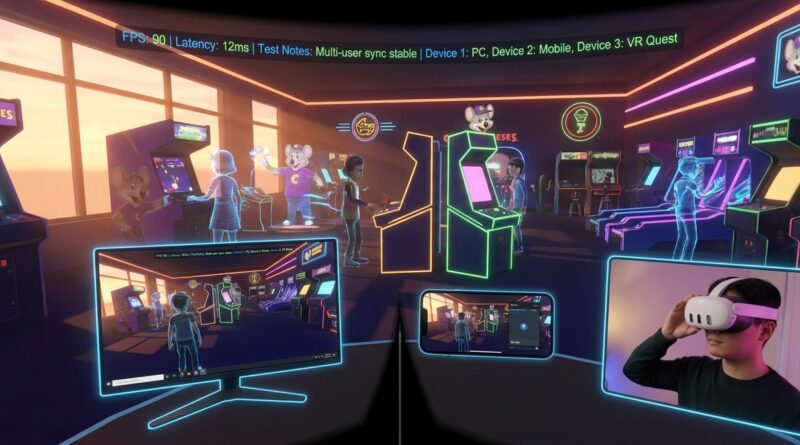
Tonight’s VR Chuck E. Cheese Open Beta: How To Turn A Nostalgia-Fueled Playground Into Your First Cross‑Device Preview Lab
You know the routine. You finally hear about a promising beta, click the signup link, and find out the form closed yesterday, the Discord has a waitlist, and now your only option is watching clipped reactions on TikTok. That gets old fast. The good news is tonight’s Chuck E Cheese VRChat open beta is the opposite of that mess. It is live, public, and easy to get into across multiple device types, which makes it more than a goofy nostalgia stop. It is a rare chance to turn a fun social world into a practical preview lab. If you are part of the Previewers Network crowd, this is exactly the kind of low-friction test space worth using right now. You can check onboarding, comfort, load times, social flow, and controller behavior without begging for an invite. Better yet, you can do it with a simple checklist and come away with notes that are actually useful later.
⚡ In a Hurry? Key Takeaways
- The Chuck E Cheese VRChat open beta is live now and works well as a hands-on cross-device test space, not just a novelty visit.
- Go in with a simple checklist. Track join time, menu confusion, motion comfort, voice chat quality, and performance on each headset or platform.
- Take breaks if anyone feels dizzy or overstimulated, especially younger users or first-time VR players. Fun betas are still real comfort tests.
Why this beta matters more than it looks
On the surface, this is easy to dismiss as a nostalgia play. Chuck E. Cheese in VRChat sounds like a meme first, a product preview second. But that is exactly why it is useful.
Good test beds are easy to enter, easy to repeat, and social enough to expose problems fast. This one checks all three boxes. You can compare how the same space feels on standalone VR, PC VR, desktop mode, and lower-power setups without needing a secret key or a publisher contact.
That matters because most people do not struggle with finding opinions. They struggle with finding a place to gather their own. A public beta like this gives you a controlled way to do that.
What to test tonight
1. Onboarding friction
Start with the first five minutes. This is where many betas lose people.
Ask simple questions. How long did it take to find the world? Did account setup get in the way? Were instructions clear? Did a new user know where to walk, click, or teleport next?
If a space built around family-friendly arcade nostalgia still confuses first-time visitors, that is useful information. Write down the exact point where someone hesitated.
2. Cross-device consistency
This is the real prize. Try to get at least two kinds of hardware into the same session. Four is even better. For example:
- Meta Quest in standalone mode
- PC VR through SteamVR
- Desktop PC without a headset
- A lower-spec laptop or older GPU setup
You are not looking for perfection. You are looking for gaps. Did one player load in much later? Were textures reduced on mobile hardware? Did voice chat cut out on one device but not another? Did avatar performance drag the room down?
3. Comfort and motion
VR comfort is never one-size-fits-all. A bright, busy space with movement, sound, and social chatter can feel great to one person and overwhelming to another.
Test seated and standing if you can. Try smooth locomotion and teleport. Notice whether menus stay readable, whether movement feels predictable, and whether there are enough visual anchors to keep people comfortable.
If someone says, “I’m fine,” but starts standing still and going quiet, check in anyway. That is often your first clue that comfort is slipping.
4. Social flow
Social VR lives or dies by tiny moments. Can people easily meet up? Is voice chat clear in crowded spots? Do players know where the “fun” is without needing a guide?
A beta can look polished and still feel awkward if groups keep losing each other or talking over one another. The best note you can take here is not “social features good.” It is “we spent three minutes trying to regroup after spawning” or “background audio made normal conversation harder than expected.”
5. Latency and responsiveness
You do not need lab tools to catch useful latency problems. Watch for delayed interactions, mismatched audio timing, rubber-banding, or visible stutter when rooms get busy.
If you want a simple scorecard, use a 1 to 5 scale for these:
- Time to join
- Frame stability
- Voice clarity
- Input responsiveness
- Comfort over 15 minutes
That gives you something concrete to compare later when the next social beta pops up.
A practical checklist you can reuse for any beta
Here is the easiest way to turn tonight into a repeatable process.
Before you join
- Note device type and connection method
- Record battery level or plugged-in status
- Close extra apps if you are on PC
- Set a timer for 15 to 20 minutes per session
During the session
- Measure time from launch to active play
- Write down any confusing menus or unclear prompts
- Watch for frame drops in crowded areas
- Test voice chat with at least one other person
- Switch movement options if available
- Note whether you would feel comfortable recommending it to a first-time user
After the session
- Give it a one-line summary
- List the top three issues
- List the top three things it got right
- Compare results across devices
That is it. You do not need a giant spreadsheet. A phone note or shared doc is enough.
How to avoid turning a fun night into bad test data
The biggest mistake with public betas is going in too casually to notice anything, or too seriously to enjoy the thing you are testing.
Keep the goal small. One session. Two or more devices if possible. A few clean observations. You are trying to spot patterns, not produce a graduate thesis on digital pizza arcades.
Also, do not test in total chaos. If the room is packed and loud, grab one baseline note there, then move to a quieter area if the world allows it. That way you can separate “the event is crowded” from “the app is unstable.”
What makes the Chuck E Cheese VRChat open beta a good starter lab
It is familiar. That helps more than people think.
When users enter a place with a recognizable theme, they can spend less mental energy figuring out what the space is supposed to be. That means they notice usability problems faster. If someone cannot find the arcade area, or if the social layout feels clumsy, you can trust that signal more because the concept itself is already easy to understand.
It is also public enough to attract different types of users. That gives you a better mix of reactions than a tightly managed private preview where everyone already knows the genre and the controls.
How to share your findings without sounding vague
If you report back to your community, skip lines like “pretty cool” or “kind of laggy.” Those are feelings, not findings.
Try this format instead:
- Platform: Quest 3 standalone
- Join time: 2 minutes 40 seconds from app open to active movement
- Main issue: Voice chat was muddy in busy zones
- Comfort note: Fine for 20 minutes with teleport, less comfortable with smooth movement
- Best part: Easy social atmosphere, clear theme, low barrier to entry
That is the kind of feedback people can actually use.
At a Glance: Comparison
| Feature/Aspect | Details | Verdict |
|---|---|---|
| Ease of Entry | Public, visible, and much easier to access than invite-only betas or closed Discord tests | Excellent for same-night testing |
| Cross-Device Usefulness | Works well for comparing standalone VR, PC VR, desktop access, and lower-end hardware behavior | Very strong as a preview lab |
| Testing Value | Great for noting onboarding friction, comfort, social flow, and latency without special tools | Better than it first appears |
Conclusion
Tonight is one of those rare moments where a beta is both easy to reach and worth taking seriously. The Chuck E Cheese VRChat open beta is live, visible, and simple to enter, yet barely anyone is treating it like a structured test bed. That is your opening. Jump in before launch, take notes on latency, onboarding friction, social flow, and comfort across four hardware types if you can, and give yourself a checklist you can reuse for the next social or immersive beta. Instead of chasing invite-only links and hoping someone picks you, you get a real-world sandbox you can use right now. Have fun with it, sure. But bring back hard data, not just vibes. That is how you turn a nostalgia trip into something genuinely useful.