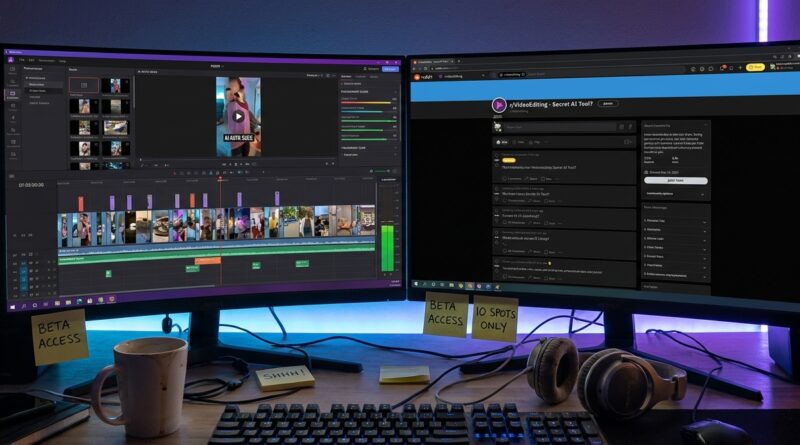
Tonight’s AI Video Clipper Beta: Turn One Quiet Reddit Post Into Your Personal Viral-Shorts Machine
You know the drill. You record one solid long video, podcast, livestream, demo, or review. Then the real pain starts. You sit there dragging through a timeline, hunting for the good 20 seconds, trimming awkward pauses, adding captions, and trying to make the whole thing fit a vertical screen without chopping off someone’s face. It is boring, slow, and weirdly exhausting. Worst of all, by the time you finish one clip, the next thing you wanted to post already feels late. That is why tonight’s AI video clipper beta test matters. A quiet Reddit post is looking for just ten real testers, not a giant waitlist full of tire-kickers. If you make content, market a side hustle, teach online, or just want your best moments turned into usable short videos fast, this is one of those rare chances to get in early and help shape the tool before everyone else starts talking about it.
⚡ In a Hurry? Key Takeaways
- This AI video clipper beta test is open now, and the team says it only wants ten real testers.
- If you work with long videos, apply quickly and be ready to give useful feedback on clip selection, captions, and vertical formatting.
- Early betas can save you time, but only if you check privacy rules before uploading client work or anything sensitive.
Why this small beta is a big deal
Most creator tools show up the same way. A shiny landing page. Big promises. No real access unless you already know somebody. This sounds different.
The interesting part here is not just that an AI clipper exists. Plenty do, at least on paper. The interesting part is that this one is asking for a tiny group of actual testers right now. That usually means the team still needs honest reactions from people who will really use it, not just people who click around for five minutes and disappear.
For readers who like getting in early, that is the sweet spot. You are not waiting for a polished launch with fixed ideas. You might still have a say in what the tool becomes.
What an AI video clipper beta test should actually do
Let’s keep this simple. A good AI clipper should remove the most annoying parts of making short-form video from long-form content.
Find the moments worth clipping
This is the hardest part for humans because it takes time, not because it takes genius. You have to watch, rewind, second-guess yourself, and decide what counts as a hook. A decent AI system should scan a longer recording and flag parts that sound interesting, emotional, funny, clear, or useful.
Resize for vertical video without making a mess
If you have ever tried turning a normal video into a TikTok or Shorts format, you know how silly it can look. Heads get cropped. Screen shares become unreadable. Good tools should reframe the video so the important subject stays visible.
Add captions people can read
Captions are no longer a nice extra. They are part of the package. Many people watch with sound off, especially in feeds. A beta worth testing should handle speech-to-text fairly well and make the text readable, not tiny or badly timed.
Save time instead of adding cleanup work
This is the big one. If the tool gives you ten clips but you still spend an hour fixing all of them, it has not solved the problem. It has moved it around.
Who should jump on this first
You do not need to be a full-time influencer for this to matter.
This kind of AI video clipper beta test makes the most sense for:
- Podcasters turning episodes into social clips
- YouTubers pulling highlights from longer videos
- Course creators making promo snippets
- Small business owners posting product explainers
- Streamers cutting reaction moments
- Consultants and coaches reusing webinar content
If you already have a pile of long videos and no time to carve them up, you are exactly the kind of tester these projects need.
How to be a tester people actually listen to
Getting into a beta is nice. Being the tester whose feedback changes the product is better.
Bring messy real-world footage
Do not just upload your cleanest sample. Use the stuff that reflects real life. Rambling intros. Two-person interviews. Screen recordings. Webcam footage with less-than-perfect audio. That is how you find out if the tool is useful outside a demo reel.
Judge the output by one question
Ask this. Would I post this clip today with little or no editing? If the answer is no, say why. Too long. Bad starting point. Awkward subtitle timing. Wrong speaker framed. That kind of feedback is gold.
Track time saved
Old way versus beta way. Measure it. If a 45-minute video usually takes you 90 minutes to cut down, and this tool gets you to a postable draft in 15, that is huge. If it only saves ten minutes, that matters too.
What to watch out for before uploading anything
Betas are exciting, but they are still betas. Think before you drag files into a brand-new service.
Check privacy terms
If you handle client footage, private interviews, internal training videos, or unreleased products, read the rules first. Look for how uploads are stored, whether files are used for model training, and whether you can delete them easily.
Expect rough edges
Captions may miss names. Clip choices may feel obvious instead of clever. Vertical framing may struggle with fast movement or multiple people on screen. That is normal at this stage.
Keep a backup workflow
Do not burn your old editing process just yet. Betas can go offline, hit limits, or change overnight. Use them as a speed boost, not your only lifeline, until they prove themselves.
Why a Reddit post can matter more than a polished launch
A quiet Reddit call for testers often means the builders are still close to the product. That is a good sign. It suggests you are talking to people who are trying to solve a real problem instead of a marketing team trying to fill a funnel.
There is also something refreshing about that. No giant keynote. No dramatic promo video. Just a simple ask for ten people who will use the thing and report back honestly.
That is often where the best tech starts. Not when it is perfect. When it is still listening.
My practical advice if you want in
Move quickly. Small betas fill fast, especially when the ask is this limited.
When you apply, be specific. Do not just say you are “interested in AI.” Say what kind of videos you make, how long they are, what platforms you post to, and what part of clipping drives you crazy. Mention if you regularly make Shorts, Reels, or TikToks. Mention if you care most about hooks, captions, speaker tracking, or speed.
That makes you more useful to the team, and useful testers tend to get picked.
At a Glance: Comparison
| Feature/Aspect | Details | Verdict |
|---|---|---|
| Access | Open beta call with only ten real testers requested | Worth acting on quickly |
| Main Promise | Turn long videos into short, shareable clips with less manual editing | Strong value if it truly cuts editing time |
| Risk Level | Beta software may have privacy questions, rough output, or missing features | Test it, but avoid sensitive footage at first |
Conclusion
This is the kind of opening our readers usually want more of. Not just news about what big companies might release someday, but a real chance to get hands-on with something useful while it is still being shaped. The AI video clipper beta test is open right now, and with only ten tester spots mentioned, this is a small window. If you are tired of wasting hours turning long videos into short clips, it is worth throwing your hat in. More importantly, it helps the community today because readers can move from watching the creator-tool race from the sidelines to helping build a tool that could become the standard way people cut highlight reels. That puts Previewers Network exactly where it likes to be. First in line, hands on the controls, and showing results by tomorrow.